Scaling a rigid design system
Atolls design system
A themable subset of white-labelled pages was the starting point, I needed to figure out how to turn it into a proper design system. The requirements were that it that should scale to accommodate other parts of the product, and also be more flexible to accommodate more and more brands.

Current state of play
The product offering at Atolls (formerly Global Savings Group), when I started in the spring of 2022 was mainly split in two; digital vouchers, coupons and affilate codes, called Connect and that of loyalty, cashback products called Loyalty. The young design system (internally called styleguides) was in place for the vouchers part of Connect but crucially didn't include affiliate codes. My main role was to include the rest of the Connect products, also knowing that the Loyalty functionality was to be integrated with Connect into a single product offering.
The styleguides leveraged a Figma plugin called Themer and was able to change the Figma Document Styles according to the branding needs and store those values outside of Figma. Changes from brand to brand were designed to accommodate fonts and colors only. I'm very hesistant about not having control over my data and where it is stored, so one of the first considerations was to get the styleguide information in a location that Atolls had control over. Secondly, the styleguide files in Figma were maintained by hand by designers and passed over to developers to copy and paste those values into code to be published to the production sites. Though this process only took a few days to get changes to a styleguide published, it left open the possibility for errors in the manual copying and pasting. Since these changes were frequent and important enough, they were a good candidate for automation.
In addition to those process issues, there were several design considerations. The typographic hierarchy and color palettes were taken from the current implementation of the MUI Material UI library since that is what the developers settled on using for the core components. I understand and appreciate the use of frameworks to get a project started as well as getting you to focus on the problems that you are intending to solve. My issue with what was implemented was that it wasn't clearly understood what decisions this component library was making and what that impact might be. The MUI Material UI library is based on Google Material Design (v2), but it isn't it. We understood it to be Material Design and that put us on some shaky foundations.
The development team maintaining the component library and design tokens had also put constraints on the designers saying that no new tokens could be introduced. This created the scenario where a text link, a chip, and a button were all coded to use the primary.main, but if one brand required the button and chip to be different colors, it required custom code for each component. This was not desirable.
The last big issue I had was maintenance. All styleguides had over 250 values defined. Lots of those values were the same across all of the brands. If a common value was to be updated, say a border radius, then that common value needed to be updated across all 50 or so styleguides. Needless to say, errors were made.
Beginning with the end in mind
I've been around awhile to see tooling come and go, and processes evolve. I've been shackled to tooling in the past which made me too locked in to be able to pivot to a better option without having to redo everything. With those lessons firmly in mind, I wanted to make decisons that allowed for change in the future while reducing widespread impact. For guidance on this I turned to the programming concept of Separation of Concerns, and seeing the styleguides as a module that outputs design tokens.
With this concept in mind, I understood that that there were two different outputs that I needed to support; one for the web production environment in the form of CSS variables and the other for Figma to be used by our Product Designers. I looked into the best practices for how to format design tokens to ensure being in the best position if we needed to switch outputs to support any change in tooling. The draft design token spec seems to have backing by some large tech companies so it felt as safe as could be. I additionally found the token transform library Style Dictionary which really enabled this transition. These two pieces, and a little trial and error got me to the following design token build process diagram.
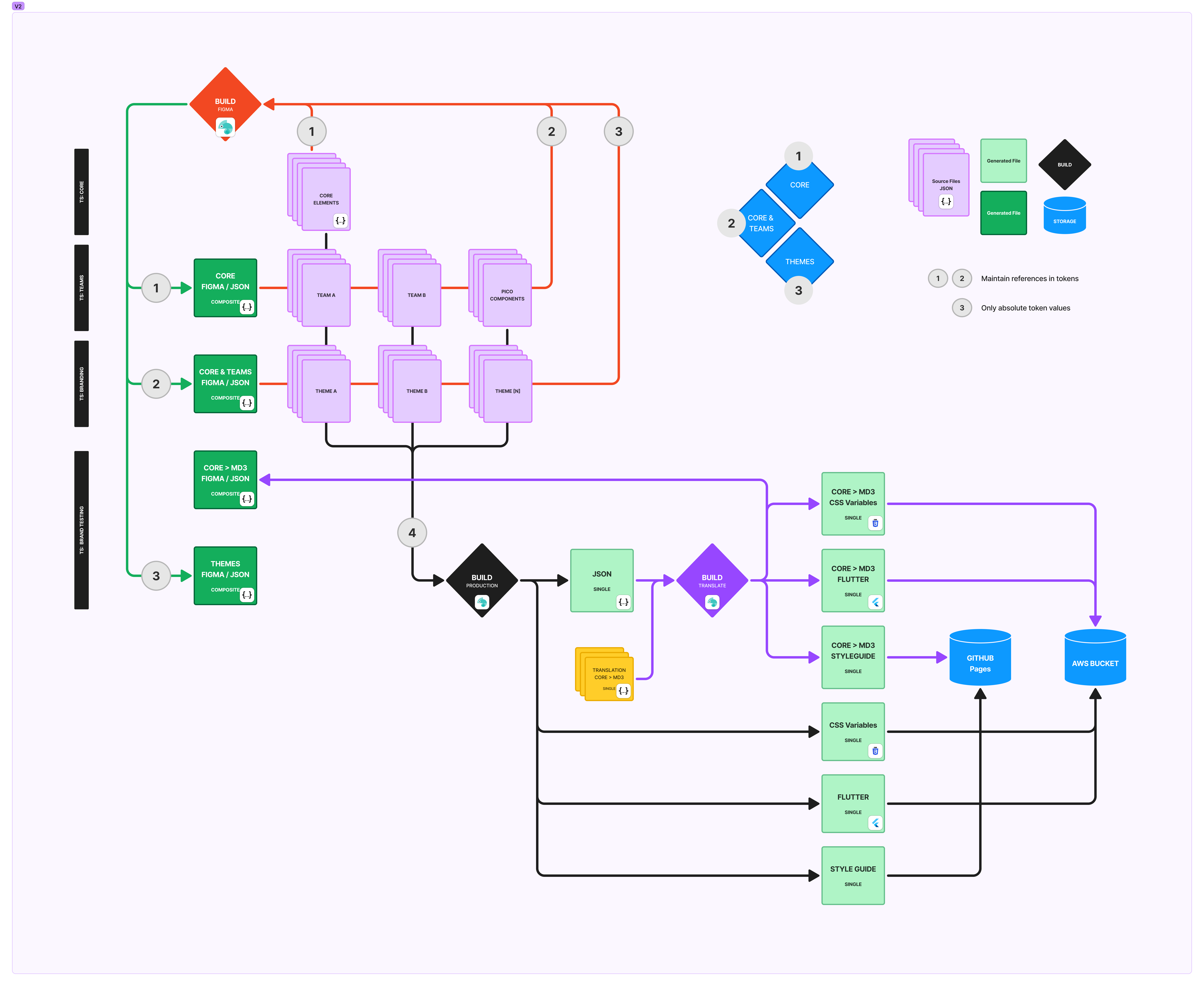
As long as I could produce consistent, dependable outputs, I could manage the tokens however I thought best. I was able to categorize the tokens and place them on different tiers with rules around referencing and overriding. It also allowed me to set up a base theme that defined all the tokens with values and each separate set of brand tokens would only consist of tokens that had different values than the base theme. Something close to 200 tokens of the 250 rarely changed across the brands we supported, so a custom brand theme may only have 20 or so tokens defined with different values. The token build process in Style Dictionary allowed me to build the base theme first then layer overtop the overrides for custom themes. In this way, if a common value needed to be updated across all themes, it only has to be updated in one token. Nice.
First things first, getting control of the data
The first issue to deal with was where the styleguide values were kept. The theme data was applied through the Framer Figma plugin and the styleguide color and typography values were stored on the Framer servers. I didn't mind much which plugin was used to manage the styleguides, but the theme data needed to be stored somewhere Atolls had control.
Tokens Studio for Figma became the best option at this point. This plugin had the advantages of being able to store the design tokens in a location of my choosing. GitLab is where Atolls keeps its repositories and, luckily enough, Tokens Studio had integration with GitLab. The downside was that tokens needed to be applied in Figma from the plugin directly. The UI of Tokens Studio is opinionated and difficult for the product design team to get their head around to use them. The friction this caused was enough to bear since it was important to get control of the tokens.
Secondly, automate all the things
Updates and commits to the GitLab repository are handled directly in the plugin and our build process was automatically kicked off for every commit into the main branch. Our working process had us creating branches that matched each feature request or update, so once all the work was done the merge into main automatically build the different output formats for our platforms.
We didn't have any preview instances setup to ensure everything was working well before publishing to production sites. Because of this, a stringent build verification was put into place. Only changes to token values could be published quickly to production sites. Any addition, removal, or changes to token names required a code review to make sure the changes were intentional. This serverly limited what we were able to do and how fast we could respond to the changes needed to support the evolution of product design. But as far as things were going, this was certainly in going in the right direction.
Lessons learned
Well, we learned many things through this process.
- The decision to move the design tokens to an agnostic format into a place we had control was pivitol to provide outputs required for our products in a timely manner.
- Relying on third-party tooling is a double-edged sword, sure it saves time so we can dedicate our efforts to solving our problems, but we became reliant and in some cases held back by the roadmap of other products. This is true of the Figma plugins Framer and Tokens Studio as well as the choice to use the MUI component library.
- Don't code yourself into the corner, understand the implecations of the choices you make and know that you will make mistakes so make sure you give yourself a way to fix them.